
Test Setup
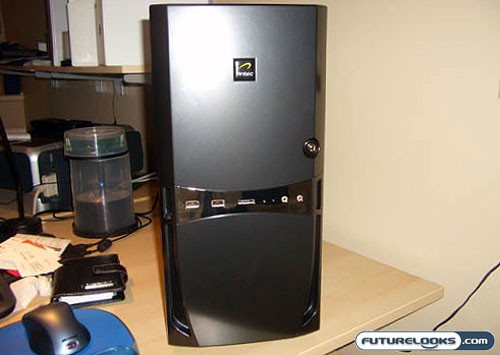
Idle conditions were set with Windows XP SP2. I booted the system and let it idle for 30 minutes before taking noise and temperature readings. Noise readings were taken with a sound meter 6” from the front, left, right, and rear of the case. Temperature readings were taken using Core Temp v0.97 with ambient room temperatures at a comfortable 21°C. The loaded conditions were established using a looping of 3Dmark2006 demo. Let’s see how this system fared.
Noise Levels:
With only 1-120mm case fan, 1-80mm PSU fan, CPU and videocard fan, I would expect this case to be “whisper quiet”.
Specification for their 120mm Tri-coolTM fan includes:
- High speed: 2000RPM, 79CFM flow, 30dBA
- Medium Speed: 1600 RPM, 56 CFM flow, 28 dBA
- Low Speed: 1200 RPM, 39CFM, 25 dBA
I started my testing by setting the fan on the low speed. Firing up the case, I was amazed by how quiet this case sounded. I could hardly tell that it was even on. Next I tried medium speed, which was a little bit louder and finally high speed, which was definitely the most noticeable of the settings.
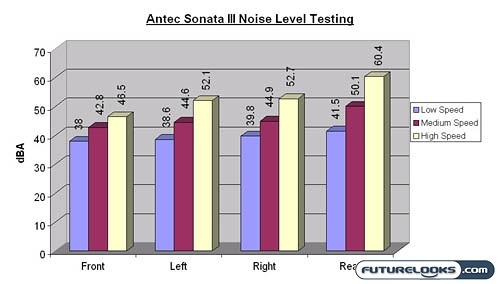
Personally, I preferred the silence of the low speed setting. However, will setting it on the lowest speed accompanied by the lowest airflow greatly affect case and system temperatures? Let’s find out.
Temperature Levels
Since we only had 1-120mm case fan, I was a little concerned with what I was going to get with case and CPU temperatures. There wasn’t even a duct on the side of the case that allowed the CPU fan to exhaust air directly out of the case, common amongst many computer cases.
The only places for the air to escape are the 2 section of slots on the rear of the case – 1 for the 120mm fan and 1 beside the expansion slots.
Let’s see how well I roasted the system:
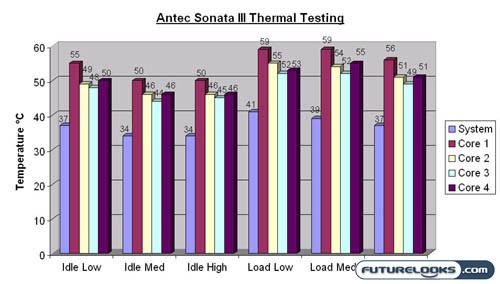
Looking at the data collected, it is apparent that case temperatures under load benefited from the higher fan speed settings. At idle, medium and high fan speeds didn’t seem to make a big difference, while at the low fan speed, we saw a slight increase in temperature.
Overall, I was surprised to see how well the case kept the temperatures reasonable with just the one large 120mm fan. One could expect to have seen slightly lower temperatures with an additional 120mm fan intake fan mounted near the hard drive bays. This extra fan would blow air directly on peripherals in the expansion slots, which would benefit those that have multiple hard drives and or multiple expansion cards like video cards, for example. The fan could be set to low while providing this additional air flow, which would have a negligible affect on noise.