
If you’ve decided to completely ditch the desktop in favor of a notebook-only existence, you may find yourself yearning for the days of dual displays again. You can certainly attach a full-size external LCD monitor, like the Asus VH242H, but that may not be the most convenient of solutions. That’s because the Mimo UM-710 from Nanovision is just so much more convenient.
Introducing the Mimo UM-710
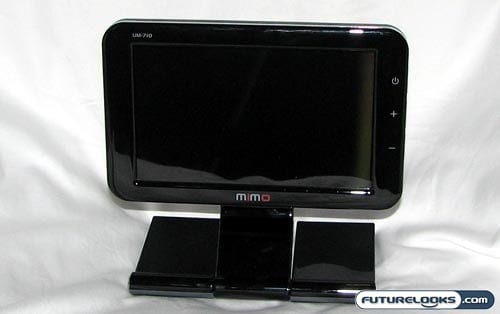
The UM-710 is an incredibly simple secondary monitor that you can attach to just about any computer. They say that it will also work just fine with netbooks too, provided that your netbook has the processing power to handle it. That’s convenient.
The Nanovision Mimo UM-710 was never meant to be a primary monitor. No matter how small your laptop or netbook may be, you won’t want to use the Mimo as your main screen. Instead, this is a secondary monitor that is perfectly sized for secondary functionality. For example, you can push your Twitter client, instant messenger, or music player off into the Mimo. This way, those “always on” applications can be removed from your precious main desktop while remaining very accessible.
The version of the Mimo UM-710 I have here is black, but if the box is to be believed, it should come in Mac-friendly white as well. Speaking of Mac friendly, the Mimo does work on Apple notebooks and desktops as well, however the current driver is still in Beta and may not be totally compatible with some software.
Features and Specifications
Taking a quick run down the provided product specifications sheet, we discover the following:
- Screen Size: 7-inch wide
- Resolution: WVGA (800×480 pixels)
- Brightness: 350 cd/m2
- Contrast Ratio: 400:1
- Number of Colors: 16.7 million
- Video Signal: USB 2.0 High Speed
- Connector: USB Mini 5-pin B type
- Input Power: USB Power
- Feature: Auto Pivot
- Product Dimensions: 195 x 97.5 x 180.2-219 mm
- Shipment Dimension: 301 x 212 x 110 mm
If you’re hoping for contrast ratios and brightness ratings that rival the best LCDs on the market, you’ll need to look elsewhere. Remember that this is a secondary monitor, so the specs are meant to slot into the “good enough” range. They’re not stellar, but they’re perfectly adequate.
Looking Inside the Box
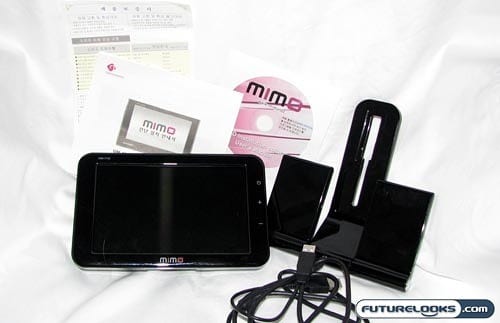
While the Mimo UM-710 could certainly be packed up and used as a portable secondary screen for your laptop, its primary purpose is to stay at your home office for your longer computing sessions. In this way, it’s not at all surprising that Nanovision did not include any kind of carrying case or pouch.
Instead, what you find inside the box is the Mimo UM-710 itself, the glossy black stand, a dual USB cable, installation CD, and supporting documentation. The CD isn’t really necessary, since they recommend that you download the latest drivers directly from the website instead.
The Nanovision Mimo UM-710 is powered by DisplayLink technology and I’m already using one of their USB external graphics cards. I found that I did not need to install any additional drivers for this screen to work. The experience on the Mac isn’t as positive though as the drivers are still in Beta and tend to disable things that required Quartz Extreme. This means things like iMovie 09 just tell you it can’t open until this display is unplugged. Bummer.