
As much as I like my trusty little laptop, I’d much prefer to watch my HD movies on my HDTV. That much makes sense, but when you get the majority of your digital content through the Internet on your computer, what’s the easiest way to send that content over to the home theatre in your living room?
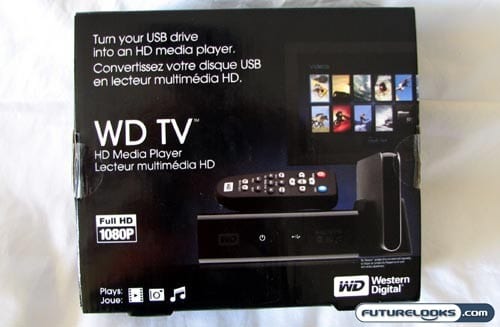
Some time ago, we took a look at the Seagate FreeAgent Theater and today we turn our attention to the competing product from Western Digital: The WD TV HD Media Player. Effectively, you are able to take the multimedia content stored on nearly any USB device and deliver it to the big screen and big speakers of the home theatre in your living room.
How does the WD TV stack up against other similar solutions? Let’s find out.
Features and Specifications
The WD TV HD Media Player acts, essentially, like a set-top box that you attach to your television. Working much like a DVD player or any other piece of home theatre equipment, it can feed media content to your home theatre or external speakers and an HDTV. The difference is that all of this content is being fed through a USB connection to the WD TV instead of a coaxial cable to your set top box.
Unlike the Seagate FreeAgent Theater, this product does not come bundled with any storage of its own. You have to provide that. They say that it is optimized to work with the My Passport and My Book portable hard drives from WD, but you can use just about any USB hard drive or flash drive on the market. Assuming that it is compliant with USB Mass Storage, you can even connect your camera, camcorder, or MP3 player directly.
Like the Hi-Den Vision, the WD TV will also output your content at up to 1080p high-definition. Naturally, the content itself will need to be encoded at that resolution too. In addition to videos, this will also do photos and music in various formats which we will go over later.
Looking Inside the Box
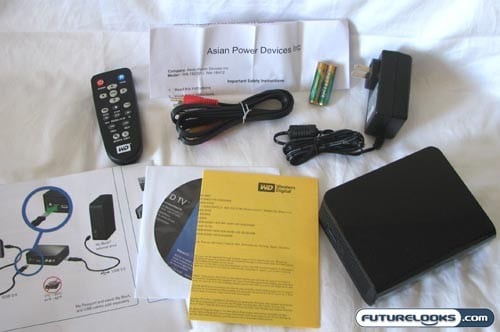
Popping open the attractively-designed box, you’ll find the HD Media Player itself, as well as a small remote, media converter software, a composite AV cable, AC adapter, and a Quick Install guide. Since the WD TV can handle HD video, I do find it a little disappointing that they’ve only included a composite AV cable. As it stands, the bundle will not fully utilize its HD capabilities due to the lack of an HDMI cable.
Remote Control Only
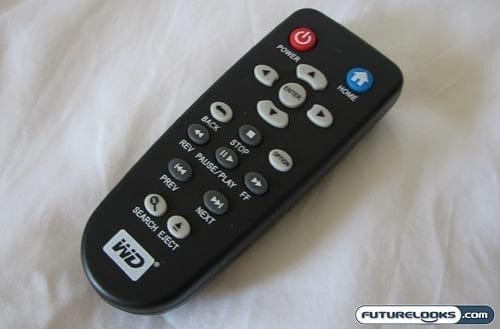
It seems that the norm when it comes to many of these types of media players is to pack as slim a credit card-style remote control as you can. Thankfully or regrettably, Western Digital did not take this approach with its remote for the WD TV. Instead, it’s a pretty normal looking remote in a pretty normal size.
Interestingly, I found that there are absolutely no buttons or controls on the set top box itself. You can’t even turn it on, as far as I can tell, from the media player. Instead, absolutely everything is controlled by the remote. I guess it’s a good thing that the remote isn’t easy to lose.