
Testing and Use
To test the Microsoft SideWinder X5, I hooked it up to my standard test rig and went to work. I actually didn’t start into gaming right away, choosing to perform some rather redundant desktop tasks that would test the comfort of this mouse over an extended period. Basically this consisted of moving some files off my HTPC and burning them to disc, something I’ve been needing to do for a while.
I was actually surprised, as the SideWinder X5 was both accurate in its tracking and comfortable to use. I still prefer the design of Logitech’s mice, which place the high point or apex of the mouse much closer to centre. This makes my hand fit over and cup the mouse in a much more personally comfortable fashion. That being said, that’s a personal preference. Someone who likes the shape of Microsoft mice will find the SideWinder X5 to be in line with those mice, and will not bend your wrist in a fashion that would make Gumby scream.
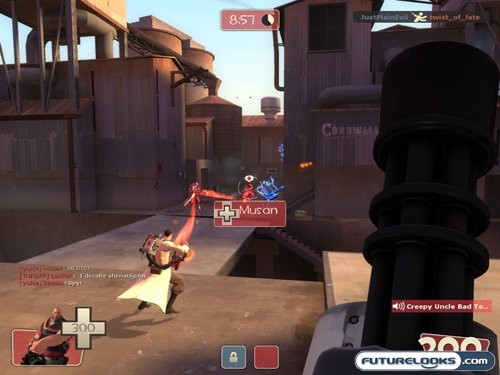
With desktop use out of the way, it was time to spin up some games and see how quickly the SideWinder performs in an all out fragfest. Using Team Fortress 2 – still currently my favourite 3D shooter – I went through playing a few classes to see how the X5 handled different play styles.
The Scout was where the accurate tracking of the 2000 dpi laser sensor came in handy. With such a fast moving character, you want to accurately control how he moves and not experience any lag. The SideWinder X5 excelled in this. Switching to the sniper required a different feature of the X5, the on-the-fly dpi adjustment. While scoped with my rifle, it was handy to have a low dpi so I can track targets much more accurately. Should a fire-fight erupt in my much more immediate vicinity, I could switch to a higher dpi for faster movement and GTFO. The Heavy, which I play the most, benefitted from the programmable buttons. I set each one to select one of his weapons, which is handy when you need to quickly move from the minigun to the shotgun for quick combat, or to your melee weapon to simply humiliate your opponent. All throughout, I found that I could keep playing without having to take a break from pain in my wrist and or forearm.
It’s The Little Things That Count
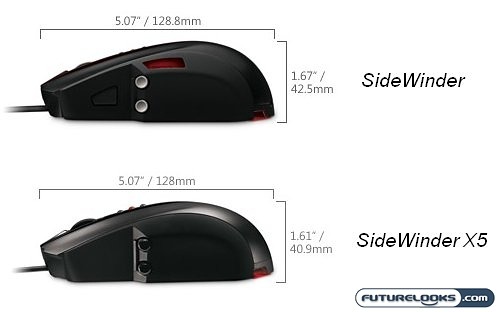
With such a drastic change in comfort, I had to figure out why. I think the image above best illustrates why the SideWinder X5 is, unlike the SideWinder. Meaning that it is actually usable for more than an hour at a time. My original musings about the high point of the mouse being further forward has actually turned out to be true. This would explain why my wrist position on the X5 is much better. Another contributing factor is that Microsoft shaved 2mm off the top of the mouse, improving hand position even further.
As for the physical feeling of the X5, I have to say it’s not quite as bad as the original SideWinder, which I likened to holding a chunk of cold hard clay. This mouse feels slightly more solid, and looks a lot better if I do say so. This is even more entertaining when one considers that the X5 is cheaper than the SideWinder. As I said in my review of the SideWinder, that mouse will appeal to a certain group of users. For the rest of, us the X5 is a good power user choice. On that note, I think it’s time to wrap this review up.
Real-Time Price and Stock Check – Find More Microsoft Sidewinder Products