
Benchmarks
Since we’re solely looking at graphic performance, we’ll be using Unigine Heaven Demo, 3DMark Vantage, Battlefield Bad Company 2, Crysis, and BioHazard 5 Demo. This should answer questions on DX9, DX10, and DX11 performance. Vertical Sync was forced off since we don’t want the frame rate to stop short of max.
3DMark Vantage
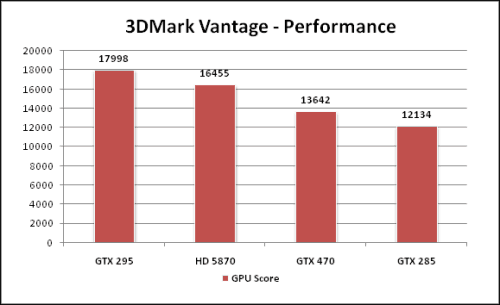
Starting off with the staple of synthetic 3D benchmarks and using the default performance settings, the HD 5870 muscles out an impressive 16,455 GPU score. 3DMark is still one area ATI video cards do well. Let’s see if it continues to do well.
Unigine Heaven Demo
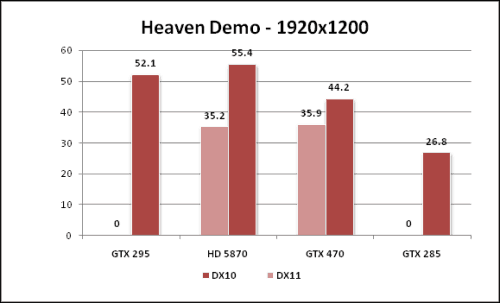
We used the Heaven Demo by Unigine because it offers both DX 10 and 11 benchmarks. The HD 5870 GPU seems to love DX10 even more so than my power hungry GTX 295. What’s interesting here is that both the HD 5870 and GTX 470 scored almost the same DX 11 frame rate even after three passes to get the average. Since the other two cards don’t support it, you don’t see any scores.
Crysis
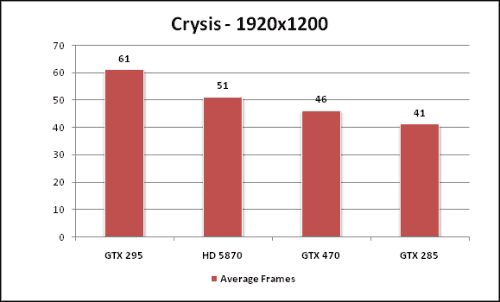
Crysis is another DX 10 video game that we still consider a GPU killer. After turning the settings up to high across the options, we see it still manages to give our cards a hard time. Personally speaking, the graphics on the HD 5870 just seemed to offer a little better color and detail.
BioHazard 5
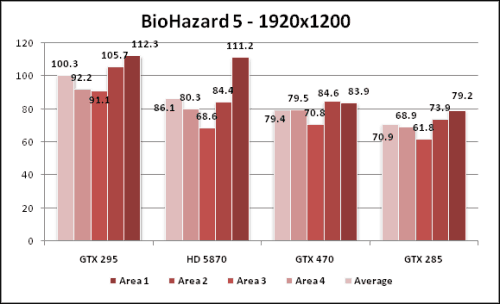
For this benchmark, we used 8x AA, highest settings, and motion blur to give the cards a challenge of some sort. With the exception of Area 1, the rest of the demo was pretty close. The HD 5870 produced 16 average frames more than the GTX 285 still available.
Battlefield Bad Company 2
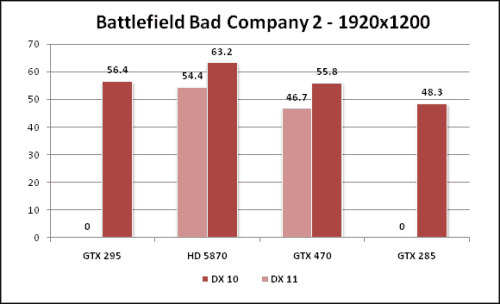
This brings us to the newest DX 11 video game out: Battlefield Bad Company 2. The thing that many news pieces state is that there is suppose to be less of a performance hit going from DX 10 to DX 11. Here, we see it’s right at about 10 frames per second still producing very playable frame rates. Might we add that the DX 11 Tessellation makes the game look a great deal more improved in our single player benchmark especially in the most detailed of areas. That’s also why our frame rates aren’t very high due to the high detailed settings. If you turn up Anti-Aliasing and Anisotropic features, expect the frame average to drop considerably.