
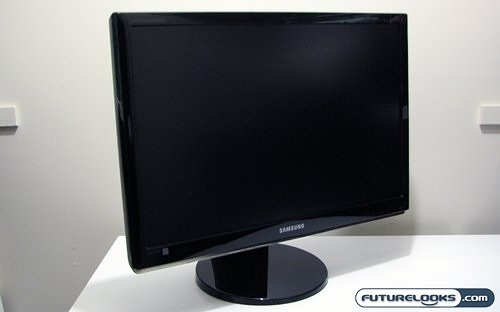
To the casual observer, it would appear that LCD monitors are simultaneously getting bigger and cheaper. While this may be true for some panels, there is a point where size and price don’t scale. Currently that point is in the range of 24″ LCD panels available. You have to shop carefully to find a panel that strikes a balance between price and performance.
Enter the Samsung SyncMaster 2493HM LCD panel. This is one of the latest entries into the market of 24″ HD ready LCD panels from Samsung, and it sports a whole host of interesting and promising features in a nice looking package. The 2493HM is housed in a gloss black bezel, and has some interesting aesthetic touches we’ll get into later.
Features and Specifications
Luckily it’s not all form over function, as the specifications are just as interesting. Here’s a quick rundown of the most important specs.
- Screen Size: 24″
- Resolution: 1920 x 1200
- Brightness: 400cd/m²
- Contrast Ratio: DC 10000:1 (1000:1)
The contrast ratio is one of those interesting new features I was alluding to. With these new lines of LCD panels, Samsung has implemented a dynamic contrast system. While the 2493HM has a static contrast rate of 1000:1, it can vary this rate based on what is displayed. It does make it difficult to pin down the actual contrast abilities of this panel, but hopefully it’ll turn out to be a benefit. Other highlights of the panel include a 5ms pixel response time, built in down-firing speakers, and a triple input interface (HDMI/DVI-D/D-Sub). Full features and specifications can be found on the product home page.
As for pricing, the Samsung SyncMaster 2493HM can be found for between $400 and $420 USD. This means that generally the 2493HM is sitting in that sweet spot between the ultra cheap 24 inch LCD panels, and the much more expensive pro-sumer level displays. This is typical of Samsung’s mainstream LCD displays, as they tend to be better apointed than the bargain basement panels, but not quite as feature rich (or using different panel technology) as the more expensive LCDs out there. Does the 2493HM break the mould, and show that it has both looks and brains? Well we’ll have to find out.
What’s in the Box?
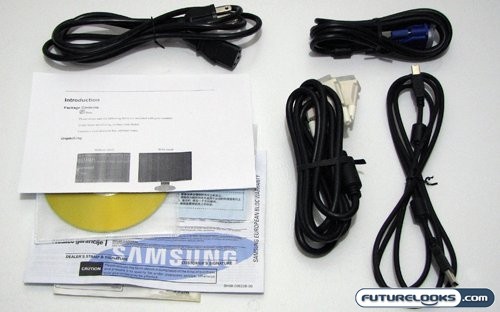
Samsung has included with the SyncMaster 2493HM pretty well everything you’ll need to connect and configure this panel. A power cable is of course included, as is a DVI and a VGA cable. They also included an A-B USB cable to allow you to connect the built in USB hub. There’s also the assorted collection of paperwork, and a CD containing drivers and software.
The software package included with this panel is Samsung’s standard MagicTune suite. This utility allows you to access and configure all the OSD settings without ever touching the front controls. There’s also some minor calibration tools, and some profile management. I still relied on the OSD for most of my tweaking.
Real-Time Price and Stock Check – Find More Samsung LCD Monitors