

A short while ago, we discussed some of the Twitter clients for the desktop and how they expand upon the functionality of the popular microblogging and social networking platform. What about when you are away from your computer? Did you know that there are plenty of Twitter clients designed for mobile phones as well?
It’s easy enough to send out a tweet when you are seated in your home office, but it may be even more important (and interesting) if you tweet while on the go. You can live-tweet a local event, for example, getting your followers to follow you around as you attend a conference, concert, or convention. Which mobile client reigns supreme? Let’s have a look at a few options.
Twitter Mobile and Text Messages

One of the features added to Twitter very early on was the ability to send out a tweet from your mobile phone as a text message. Each region has its own access number and you essentially send an SMS to this number and it will update your Twitter account. If you don’t have a data plan on your phone, this is really the only mobile option for you. The text messages aren’t free, but Twitter doesn’t charge you anything directly.
Unfortunately for Canadians, we’re not able to receive Twitter tweets. In this way, SMS tweeting is largely a one-way street for Canadians. However, this policy has recently been relaxed by some carriers. Even if you are able to receive tweets, that could result in far too many text messages flooding your phone. If you follow hundreds of people (like I do), this can be more pain than what it’s worth.
If you don’t have the opportunity to install a proper Twitter client on your phone, you can still access the mobile version of Twitter on m.twitter.com. This is a very barebones approach, not unlike the regular website, but it’s stripped down even further. You can read replies, but not direct messages. There is also no integrated support for URL shortening, retweets, or TwitPics.
Pros: No installation needed, convenient
Cons: Absolutely no bells or whistles, very basic
Verdict: A simple solution for emergency tweeting
Windows Mobile Gets ceTwit
Since there are more competitors in the market today, Windows Mobile isn’t quite as popular as it used to be. Let’s face it. Windows Mobile isn’t the prettiest smartphone operating system out there and while it may be functional, it’s not particularly user-friendly. If you are rocking a Windows Mobile smartphone, though, you still have tweeting options.
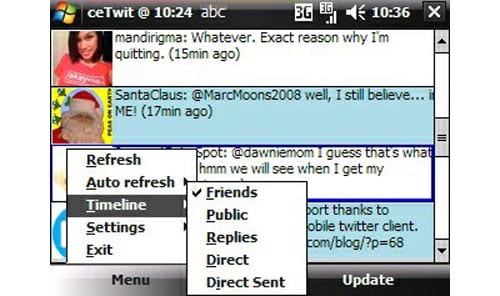
One of the better Twitter clients for Windows Mobile is ceTwit and it also happens to be completely free. You get all of the basic abilities of a Twitter client, including access to replies and direct messages. There is also an auto-refresh feature, so you don’t have to refresh manually when you boot up ceTwit either.
Unlike the mobile Twitter site, you get to view user avatars in ceTwit as well. The different types of tweets are also color-coded, not unlike Twhirl. Other features include retweeting, copy-and-paste, ping.fm support, and access to TwitPic. Just about everything a Windows Mobile user would need can be found with ceTwit.
Pros: Full support for retweets, TwitPics, and avatars
Cons: Clunky Windows Mobile interface
Verdict: The best Twitter client for WM users