
Performance
For testing the performance of the Tuniq 3 case I moved all the components from my previous case into this one. The manifest includes:
- AMD AM2 X2 3800+
- Zalman CNPS7700-Cu CPU Cooler
- EliteGroup KN1SLI Motherboard
- MSI 7600 GT Video Card
- eVGA 7600 GT Video Card
- Samsung 200 GB SATA 7200 RPM Hard Drive
- LG DVD Writer
- Antec TP_II550 True Power 550W Power Supply
Although not an extremely high performance system, it’s definitely representative of they layman’s system. The use of the two video cards in SLI mode should create a bit of extra heat which the Tuniq 3 will hopefully be up for the challenge of cooling off.

Once my computer was powered up and the fans started whirling away with their blue glow I thought it looked pretty cool and didn’t actualy sound too noisy at all. The majority of the noise in this particular setup does not come from the three 120mm case fans that the Tuniq is supplied with but rather the Zalman CPU Heatsink and the Antec TruePower PSU. The two 7600GT’s use fairly silent cooling mechanisms making them unnoticeable.
Noise Level
One thing I am getting a bit more into is trying to keep my machines as quiet as possible. Granted I currently do not have a spare room for my 3 computers so when I received the Tuniq3 case I was a bit worried about what sort of noise three 120mm fans would produce. I turned off all external noises such as other computers, music and fans in the room so that I could get noise level reading prior to turning on the computer. Once I took my everything-off reading I then powered up the computer with all three 120mm fans spinning in addition to the other two 120mm fans that are part of the setup. The results as as follows:
- Initial Noise Level with everything turned off: 47.4 dB
- Machine fully running including the three 120mm fans: 51.3 dB
The results show that with all five (yes…five…) 120mm fans running, the ambient noise increases by almost 4 dB which to me is acceptable for one machine. The three 120mm fans that come with the Tuniq 3 case run at a slow speed of 1,000 RPM whereas the other two 120mm fans I have in the case both run at 5,000 RPM and unfortunately, those I can not change the speed of to match that of the other Tuniq units.
Temperature Levels
One important aspect of a computer enclosure is to ensure that the components within are kept at a temperature that allows the components to perform at an optimal level. You would not want to be able to cook an egg on your video card right? Let’s see how well the Tuniq 3 with its three 120mm fans stand up to keeping my computer cool in an ambient room temperature of 23°C.
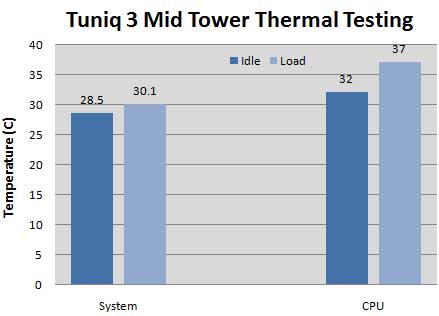
In order to establish idle temperature, I freshly booted up the computer and ran it for thirty minutes. After I was content with the results, I fired up Assassin’s Creed in order to get a load on the CPU to increase the overall temperature. While playing Assassin’s Creed I noticed that the system temperature only rose about 2°C while the average temperature of my CPU’s cores rose roughly 5°C. I played for a little while more and the temperatures did not seem to fluctuate more than 0.1°C which I would say is a pretty decent cooling job. So without a large fluctuation in overall temperature I would be content in saying that the three 120mm fans that this Tuniq 3 case provides does a pretty good job in keeping the temperature in check.
Real-Time Price and Stock check – Check More Products