
Final Thoughts

My past few weeks with the RAZER Piranha Gaming Communicator have been pleasant. The sound reproduction for the headset has been quite impressive when watching movies or gaming. The comfort level during prolonged use has also impressed me. I can lay in bed for hours listening to music or sit at the computer, gaming away without having to remove the headset due to discomfort. Despite the great level of comfort, I do have a few nitpicks and thoughts about the construction of the headset itself though.
For starters, the microphone can only be used on the left side. For righties, this can be a problem. Personally, I like to have the microphone on the right side, but I know that you can’t simply move it around without redesigning the whole headset. However, it really didn’t take long to get used to it.
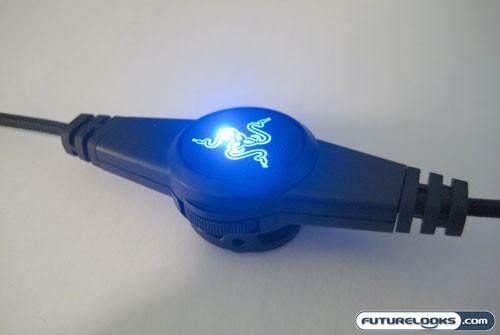
The other item I would like to note is my issues with the volume control. There are no indications or labels to tell me which is the mute position for the microphone’s switch. I could be talking to myself for hours without even knowing it. The volume control is also a bit flaky; it doesn’t increase or decrease the volume at a nice even rate. It’s either, full, middle, or off even though it is a dial (rheostat) that is controlling the volume. It should give me either a gradual increase or decrease in the sound level, not these “zones” of sound level. The other issue I had was when I turning the sound down via the dial, the right earphone would cut out, but the left headphone would continue to play, albeit at a lower volume. Perhaps my headset is faulty?
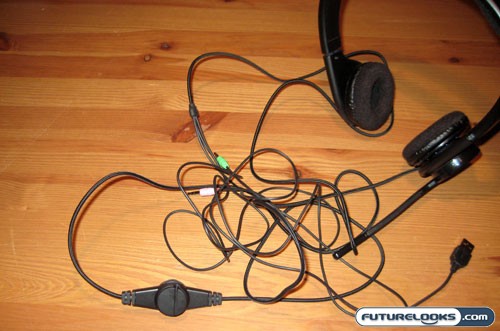
Because of the 3 cables that branch out from the main cable, the wires get all tangled up. Remember the cable length of this is 3 meters. Sure that can help attach the headset to the back of desktop PC that is on the ground and away from you, but when you’re trying to keep wires neat and tidy, it is almost impossible. They ultimately get tangled up. RAZER might want to look at using a retractable type cord so that if you’re not using the entire three meter cable length you can neatly store it away.
Overall I have enjoyed using the RAZER Piranha Gaming Communicator. Despite the issues with the volume dial and the cable management, they aren’t things that would really keep me from using this comfortable and great sounding headset.
Pros
- Ultimate comfortable design – Can be used for long periods of time
- Great Clarity and sound reproduction
- Rigid and Sturdy construction
- Look great while wearing it! (might attract women ;))
Cons
- 3 meter cable can be a tad too long
- USB only powers LEDS and serves no other purpose
- Cables can get tangled up easily

Real-Time Price and Stock Check – Shop Like a PRO!