

Given the rising popularity of condo and apartment living, most people simply do not have the same kind of space in their homes that they may have had in the past. This is especially true in bigger cities like Vancouver where it’s hard to even find a decent 600 square foot condo for under $300,000. Yup, we’re living in some rather cramped quarters these days.
The situation is further exacerbated for people who work from home (like me). It’s important to have a separate space to serve as a home office, but you may not be able to dedicate an entire room to this purpose. How can you deal with the limited real estate while still being able to achieve the same level of functionality and productivity that a larger home office would offer? The following list of product ideas is far from exhaustive, but these items will certainly help in maximizing the limited space that you have at your home office or even your dorm room, whether you’re a Campus Bawler or a Starving Student.
Wireless Keyboard and Mouse
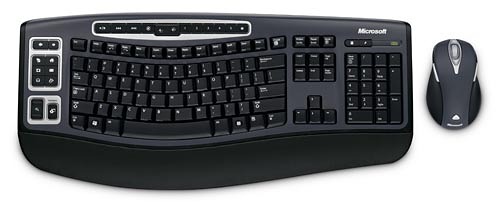
There are a few reasons why you may want to invest in a wireless desktop solution like the Microsoft Wireless Laser Desktop 5000 pictured above. If you were to buy your keyboard and mouse separately, it would typically mean that you would need to have two separate connections to your computer. If you buy a wireless desktop, they connect to your computer using a single wireless receiver. This can significantly reduce clutter on your desk or table.
Another major advantage of going with a wireless desktop rather than a wired one is that you don’t have to mess with any tangled cables. If you have to use your computer table for some secondary purpose, it is a lot easier to stow a wireless keyboard and mouse away somewhere rather than having to disconnect a set of cables. It’s just much more convenient. Need the space to organize your bills and income tax documents? No problem. (Just don’t come to us for tax advice.)
Speaking specifically to the Microsoft Wireless Laser Desktop 5000 pictured here, I appreciate the relative accuracy and responsiveness of the wireless laser mouse, as well as the comfortable scroll wheel and two thumb-side buttons. The keyboard is similarly equipped with programmable buttons and dedicated media controls.
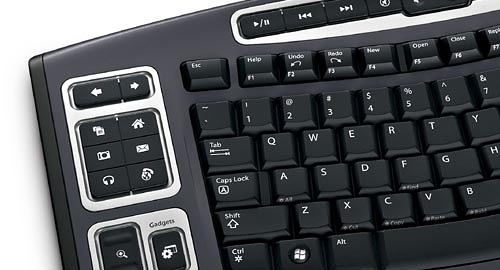
The Microsoft Wireless Laser Desktop 5000 can be found for around $50 online. It’s not the newest thing in the world, but it gets the job done.