
The megapixel count on digital cameras continues to increase and more digital camcorders are coming to rely on flash memory cards for storage. The tried and true Secure Digital (SD) format is reaching the end of its lifespan, because it just doesn’t offer enough capacity anymore. In case you didn’t know, it is not possible to get an SD card that carries more than 2 gigabytes of memory. That’s where the revitalized SDHC format has come into play, offering tons more storage in a form factor that is no larger than a standard SD card. In fact, the SDHC format has a theoretical limit of 32GB. That’s a lot more than 2GB, wouldn’t you say?

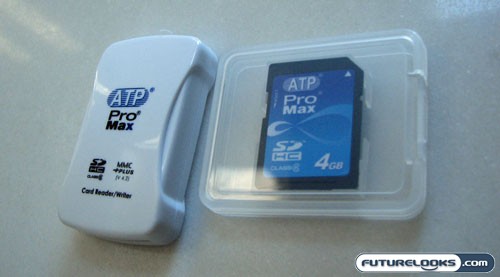
We had the opportunity to the take the 4GB ATP ProMax SDHC memory card for a test drive and our overall impressions are quite positive. Because the SDHC format isn’t backwards compatible with SD devices, you’ll need a special SDHC card reader if you hope to use this card with your computer. Thankfully, ATP has included one such reader for free as part of the package. What a deal!
Speed and Space
Compared to most conventional SD cards, the ATP ProMax SDHC card is not only more capacious, but it is also faster. This is even true when you compare this card against SD cards that are marketed as being “high-speed”. On the packaging and on the card itself, you’ll see am emblem that tells you that this SDHC card is Class 6. What this means is that ATP guarantees a minimum data transfer rate of 6MB/sec. Putting it through its paces in HD Tune, we found that it not only met this expectation, it far surpassed it.

As you can see through the screenshot above, the minimum data transfer rate was 19.3 MB/sec. This is over three times as fast as the guaranteed minimum. The maximum wasn’t much faster at 19.9MB/sec with the average clocking in at 19.8MB/sec. Access time was equally speedy at 1.1ms.
But that’s a benchmark. How did this card perform in a real world test? Well, to see how it fared, we dumped a 700MB video file onto and out of the card using the provided card reader, connected to a standard high-speed USB 2.0 port. When transferring the file onto the SDHC card, it took 45.937 seconds. When transferring the file out of the card (and onto the hard drive), it took 37.875 seconds. This works out to data transfer rates of 15.3MB/sec and 18.5MB/sec, respectively.
On a side note, although the card is being billed as a 4-gigger, actual usable space rings in at 3934MB. Of course, that slight deficit can be expected with just about any memory device.
Real-Time Price and Stock Check