
World in Conflict
Real Time Strategy (RTS) games are popular. Anyone that’s played Starcraft or Command and Conquer knows what I’m talking about. However, some games are very demanding and World in Conflict can easily take your system to its knees. We put it to the test to see whether we can get away with the IGP or under Hybrid CrossFireX.
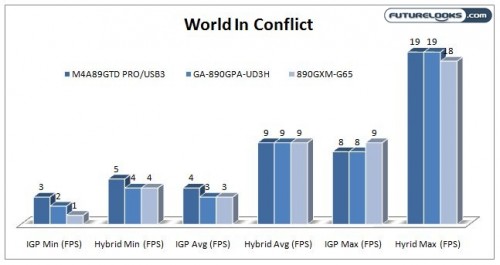
A game like World in Conflict stresses both CPU and GPU, but unfortunately, we couldn’t get any playable frame rates using default settings, despite our use of the Hybrid CrossFireX action.
What’s The Verdict on CrossFireX?
That takes us to the end of our game benchmarks. While it’s pretty clear that Hybrid CrossFireX can make a huge difference in frame rates in some games, it still might not be enough to get you from unplayable to playable. However, I can see this technology being extremely useful for games that are older such as many DirectX 9 titles. If there are any games you want us to check out, just drop us a note in the forums or leave a comment and we’ll check that out. But as for its performance in modern DirectX 10 titles, we’ve got titles that come close to being playable and some that still aren’t playable at all.
I did want to pass on a quick tip for those of you that want to setup Hybrid CrossFireX. Initially I assumed that you would keep the cable connected to the board as you add the HD 5450 for Hybrid CrossFireX. I tried for hours installing and uninstalling drivers to get the CrossFire option to show up in the ATI control panel. What wasn’t explained clearly in any of the manuals was that you would need to detach the cable from the IGP and connect it to the HD 5450. Only then will the CrossFire option be enabled in the ATI control panel and you can turn on the Hybrid CrossFireX option.
What’s The Verdict on the HD 4290 IGP?

One of the things that is completely underrated about the HD 4290 IGP on the 890GX chipset is the fact that despite its budget nature, it does retain many of the features that make ATI GPUs great which is the 2D image quality. Colors were good and text was sharp all the way up to 1920×1080, making this solution great for stand alone productivity tasks. The other feature that often gets missed in the discussion of this IGP is the fact that it’s no slouch when it comes to dual monitor support. Using both DVI and HDMI you can run dual monitors using the built in graphics, thus forgoing the need to buy an external graphics solution. This quality seemed similar throughout the ASUS, GIGABYTE and MSI boards. One thing to note though is that you cannot use the DVI/VGA port simultaneously as they are one and the same so take your pick.
With support for all of AMDs Quad Core CPUs (and future support for their six core CPUs as well), the 890GX could be a pretty powerful workstation platform as long as intensive 3D graphics performance isn’t a factor. With GPU acceleration for things like video encoding and Flash, the HD 4290 easily makes the 890GX a decent all day everyday use system.
One observation I did make while inspecting all three boards was the fact that the on both the ASUS and the MSI board, the connectors for the VGA/DVI ports were extremely flimsy. This is due to the fact that the connectors are anchored to a plastic connector which is soldered to the board. The GIGABYTE uses a much stiffer and stronger metal connector that should last much longer.
890GX Power Consumption
We took all of our platforms and got full system readings using each of our systems. Idle conditions were established after waiting for 5 minutes after the system booted into Windows 7. Load conditions were established running Cinebench 11.5’s multi-threaded CPU test. We also enabled all of the power saving modes in the BIOS for each board, allowing us to get a best case scenario.
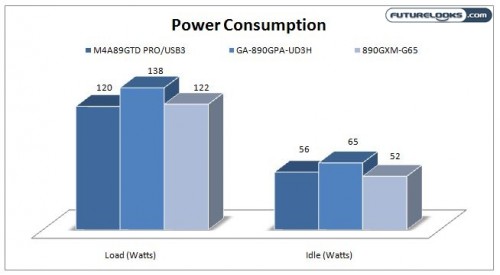
Our initial hypothesis was that the Micro ATX MSI would have the advantage simply because, in general, Micro ATX boards use less power than their ATX counterparts. After our tests, we can see that our hypothesis was mostly correct as the MSI gave us the lowest idle consumption of 52 Watts. It was only second to the ASUS in the fully loaded scenario. What was very surprising was just how far out the GIGABYTE results proved to be. It’s a total power hog and I suspect that the board’s overpowered USB ports could be the culprit.
Overall, the numbers are fairly impressive given all the features that are included with each motherboard. You get it all including the latest SATA 3.0, USB 3.0 and a quad core CPU to boot. Combined with decent graphics for productivity, you have an all day use system that won’t put the hurt on your electrical bill. If you need a green board, definitely go for the MSI 890GXM-G65, however, what was most impressive was the consumption of the ASUS M4A89GTD PRO/USB 3 which only gives up 4 watts at idle, but uses 2 fewer watts at load. It’s also the most feature rich board of the bunch.