
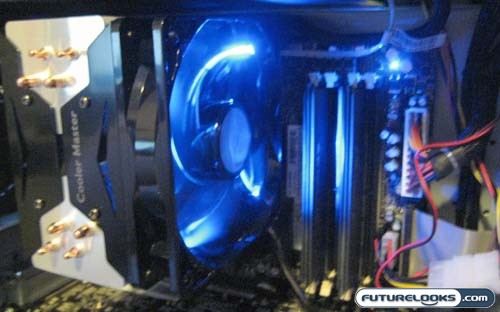
The air did flow rather well once the system was powered up. The first thing that I noticed, or at least my ears noticed, was how quiet the Cooler Master Hyper 212 was at full speed in comparison to the OEM cooler I just removed. The second thing I noticed was the pretty blue lights. Not one to shy away from a trend, Cooler Master has put blue LEDs on the 120mm fan attached to the Hyper 212. This large, bright fan provided the Hyper 212 with some great results once we stopped staring at the pretty lights and got to work.
Before I get to the performance numbers, I need to address a couple issues with the installation. The first was also the weirdest issue I’ve ever seen. The large holes on the mounting brackets are reverse threaded; something that is present on both the Intel and AMD brackets. No mention is made of this in the manual, and it can be quite confusing for those of us used to “righty-tighty, lefty-loosey.” Upon further research, I dicovered this is required to keep the screws from being unscrewed when you are installed the cooler. The other gripe I have is the need to remove the mobo for both installations, AMD and INTEL. Let’s see how well this cooler did.
Performance Comparison
To test the Cooler Master Hyper 212 CPU cooler, we sealed our OEM case and started up the system at default clock speeds. We let the system run idle for 30 minutes, and took a reading to establish a stable idle temperature. We then loaded SiSoftware Sandra and spun up the computer burn-in scripts that are included. The purpose of these scripts is to push your entire system to it’s limit to ensure it’s stable. We simply chose the CPU based tests, which would pin the CPU at 100% on all four cores and give the Hyper 212 a good thermal workout. After an hour of slow roasting, we took the temperature of the CPU. Once this was done, we jacked up the processor speed to 3.2GHz and did it all over again. First here’s how the OEM CPU cooler faired.
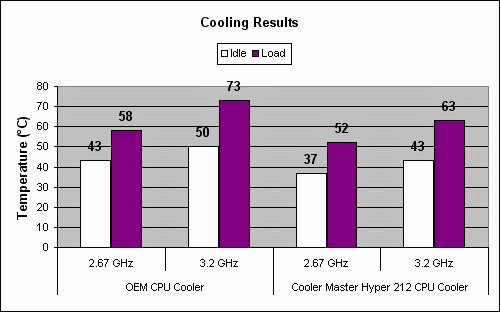
The numbers posted by the Cooler Master Hyper 212 were more impressive than what I would expect from a mid range tower cooler. With the processor clocked at it’s default 2.67GHz there was a 6 degree performance difference between the OEM CPU cooler and the Hyper 212 CPU cooler at both idle and under load. This is a respectable difference, but not as impressive as the overclocked numbers. When we cranked the Core 2 Extreme up to 3.2GHz and pinned all four cores to 100% CPU usage, we liked what we saw. At idle the Cooler Master Hyper 212 posted a 7 degree drop in temps over the OEM cooler, and at load it dropped a rather big 10 degrees.
Acoustic performance is another area where we saw the Cooler Master Hyper 212 thoroughly trounce the OEM cooler in our test rig. These are the results posted by our digital dB meter, placed six inches away from the side panel directly above the area of the cooler.
- OEM CPU Cooler – 43 dBA (full speed)
- Cooler Master Hyper 212 CPU Cooler – 38 dBA
Now these numbers aren’t exclusively caused by the CPU coolers. There is some bleed over from the surrounding fans and components. Still the 5 dBA performance delta between the OEM cooler and the Hyper 212 translates into the difference between a maddening scream and a dull roar from. It’s safe to say the Hyper 212 qualifies as a quiet cooler.
These numbers do need to be taken as they are. Though a significant drop from an OEM cooler that is only designed to keep the processor from frying, the overall numbers posted by the Cooler Master Hyper 212 are only good within it’s own class of midrange coolers. That being said, the Cooler Master Hyper 212 is nice and quiet at full speed, and it managed to keep quiet while keeping the CPU cool.
Real-Time Price and Stock Check – Shop LIke a PRO!