HD Tach
Using HD Teach, we were able to put together some basic results for your perusal. Keep in mind that these results are dependent upon the hardware used like the iSTAR xAGE 901 Docking Station that was made available for testing. It offers USB and eSATA connectivity, but isn’t the fastest external storage available. The main purpose here is to confirm we have no “errata” within the platform and all the supported features indeed work.
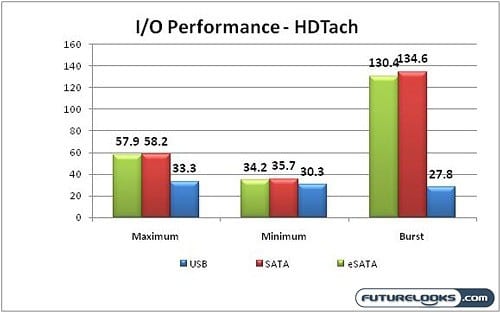
To the naked eye, all tests seem within normal parameters of performance and eSATA and SATA performance is comparable as it should be. USB 2.0 puts up a fight but is ultimately handed the short end of the stick by it’s interface and a cap of 480mbps. Of course, in the real world, we would never hit that. Unfortunately, we weren’t able to perform Firewire 400 tests on the board due to the lack of a docking station or external drive that supported it.
Audio Experience
Audio is a lot like beauty. But, rather than in the eye, it’s in the ear of the beholder. The integrated audio will suffice for anyone willing to sacrifice a little recording quality. You can expect decent audio quality in gaming, music, and movies. However, if audio production is your specialty, you’ll naturally want to pick up a good sound card for the best recording and playback possible. It isn’t horrible by regular user standards and is intended to offering something decent at a cost benefit.
Overclocking
Overclocking the platform was actually easy due to your options. You can do it the old fashioned way via the BIOS which is nicely arranged for enthusiasts on this very mission. Or, you can install EasyTune 6 which is GIGABYTE’s very own overclocking utility. It’s much more user friendly than going through the BIOS and contains a few pre-configured respectable overclocking selections. Of course with any overclocking, please exercise extreme care because things can go poof with too much voltage and extra high temperatures.
Whether using the BIOS or ET6, a maximum 200 MHz CPU Bus using a 21 Multiplier was obtainable while easily supporting some Kingston HyperX 2000 MHz DDR3 Triple Channel Memory. This is an excellent result for a “budget” platform.
It seemed that this processor was the limiting factor till doing a little research. Some forums have a few users encountering similar results with some getting higher with their Beta BIOS updates. It’s probably wisest to stick to official BIOS updates to avoid any warranty and red tape if something goes wrong.
Final Thoughts and Conclusions
Compared to previous chipsets with GIGABYTE’s VRD 11.1 support, energy conservancy wasn’t quite as prominent. To be fair and impartial, this isn’t so much GIGABYTE’s fault. The minimal 20 Watt difference observed here is due in part to the X58 chipset which requires more power on hand at all times with the Core i7 965 processor used in testing. In any other setting where applicable, the chipset does exactly what it should to keep the platform stable. Thus, the EX58-UD3R gets an “A+”.
In terms of 3D performance, it’s a great gaming platform for the budget conscious. The potential is right there at your finger tips. There’s nothing it can’t do to help the most serious gamers win. All it really needs to convince you is a decent video card like a Zotac GTX 260 (216 Core), Zotac GTX 285 or GTX 295 AMP Edition.
In terms of processor support, the GIGABYTE EX58-UD3R can make near maximum use of your Core i7 series processor by offering some great overclocking potential. The Core i7 965 just doesn’t have a lot of extra room to stretch which further gives the hardcore enthusiasts something to think about when selecting a CPU. One could easily use the slower i7s coupled with the EX58-UD3R, overclock to match the 965, and spend that saved money on a better video card.
If there’s a major negative about the board given its purpose, it isn’t evident in terms of performance. Stability is the main factor when considering a performance based system. All things considered, you should be very pleased choosing the GIGABYTE EX58-UD3R Motherboard. It’s the best bang for buck X58 Crossfire experience at the entry enthusiast level.
Pros
- New Balanced Theme
- Flag Ship Look
- 2 oz. PCB design
- 200 CPU Bus Overclocking
- Supports 2000 MHz DDR3 Memory
- Great Bang For Buck
Cons
- Graphics Slots Seem Close
- Bundle A Little Too Light
Overall Rating: 9.0 / 10.0